

Key Takeaways
Data lineage is like a family tree for your data: it shows how information flows from sources to reports and how tables, columns, and dashboards depend on each other. It allows teams to trace errors, assess the impact of changes, and build trust through transparency. Lineage also supports governance, compliance, and migrations, making it a critical part of modern data infrastructure as data volumes, regulations, and tooling evolve.
“If I change this field, how can I be sure I won’t break anything downstream?”
“The finance dashboard looks off. Where can I check what data powers it?”
“If I replace this table with a more optimized one, what dashboards will I need to update?”
These are the kinds of questions data engineers and analysts face daily. And too often, the answer involves reading source code or pinging the one person who knows. But that person—often your most senior engineer—has better things to do than chase down data dependencies.
In this article, we’ll explain what data lineage is, what it looks like in practice, and why it’s become a must-have for data-driven organizations. We’ll also explore key use cases, both technical and operational, and go deep on how lineage is computed for those who want to understand the nuts and bolts.
What is data lineage?
Data lineage is the precise map of where data originates, how it’s transformed, and where it’s used—tracked down to the column-level (gold standard) for instant impact analysis and governance.
Think of data lineage as a family tree for your data. When you create a new table (“child table”), you often derive it from other existing ones (“parent tables”). Lineage traces these relationships across the entire pipeline. This traceability is crucial. If you notice an error in a report, you need to know where that data came from. If you want to change a table, you need to know what it will affect downstream. Lineage answers those questions.
Why data lineage matters
- Prevent breakage before deploy: run impact analysis to see exactly which models, tests, and dashboards a change will affect.
- Faster root-cause analysis: trace a bad metric back to the specific step and column that altered it.
- Prove trust & compliance: show how a KPI is produced, who owns it, and its access path for audits.
- Speed with safety: unlock refactors, platform migrations, and schema updates without firefights.
- Shared understanding: align data producers and consumers with definitions, contracts, and SLAs in one place.
How data teams use lineage day-to-day
- Change management: evaluate downstream impact before merging PRs or altering schemas.
- Debugging: pinpoint the step that changed a value, type, or grain.
- Governance & audit: demonstrate data flows, approvals, and control points on demand.
- Migration & modernization: map current dependencies to plan safe cutovers (e.g., to Snowflake or Databricks).
- Quality & testing: target high-risk paths for tests and enforce contracts between producers/consumers.
- Cost & performance: identify redundant transforms and unused outputs to simplify pipelines.
What does data lineage look like?
At first glance, lineage graphs can be complex—dozens of nodes with hundreds of connections. But modern UIs simplify the experience by zooming in on specific use cases. Instead of showing the entire map, tools like Coalesce highlight just what you need to see: a single column, a specific table, or one pipeline. This makes lineage useful not just for engineers, but also for analysts, governance teams, and business users.
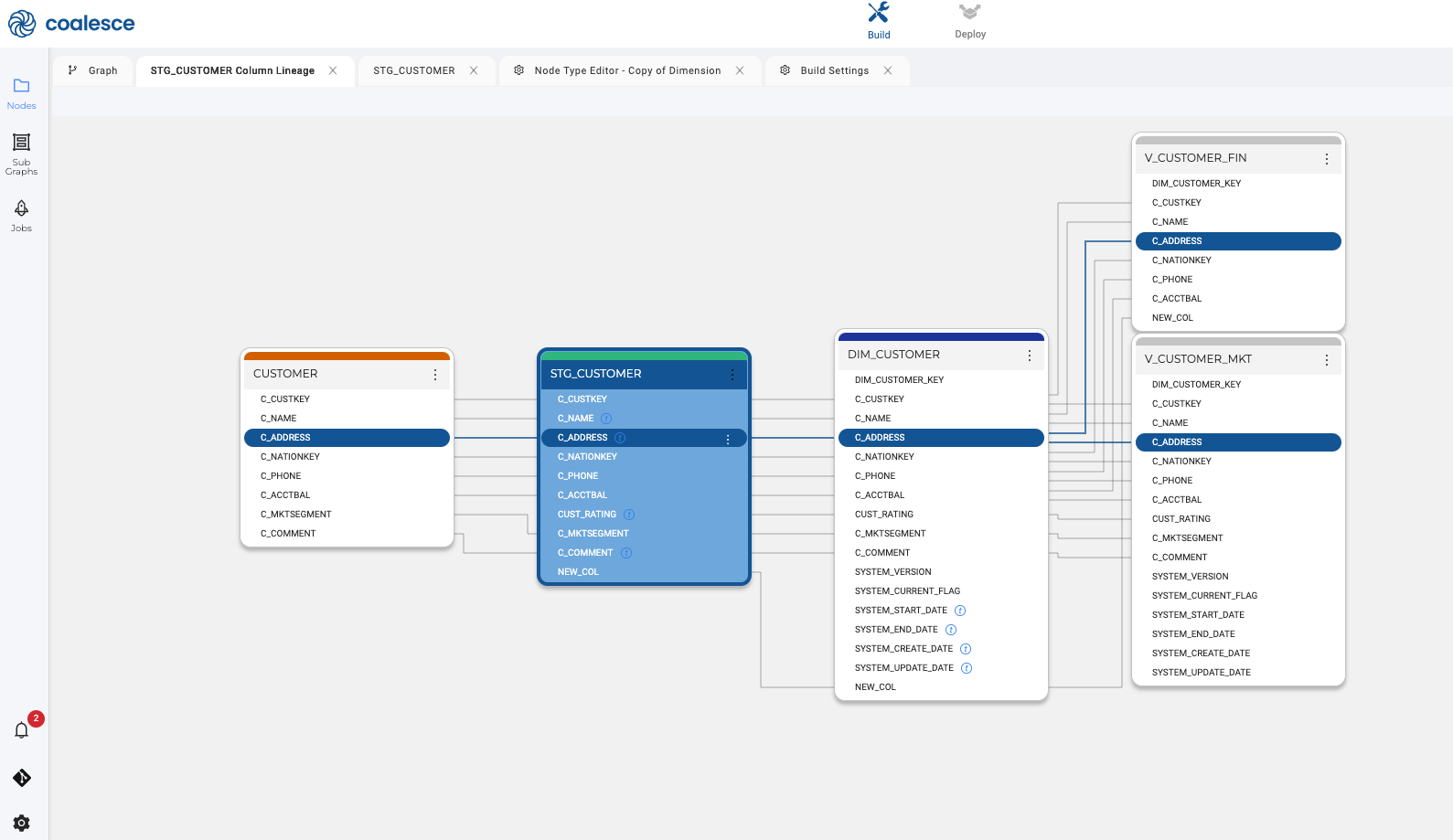
In Coalesce, lineage is generated as you build: every transform, column, and dependency is captured automatically and linked to business context in Coalesce Catalog (owners, terms, SLAs). This gives teams real-time visibility from source systems to KPIs, so changes ship faster with fewer surprises and audits are straightforward.
Why do data teams need lineage?
Data troubleshooting: When something looks wrong in a dashboard, the first question is: is this a data issue or a business issue? End-to-end lineage helps you trace that anomaly back to its source. Maybe a pipeline failed. Maybe a data source changed. With lineage, you can find the root cause faster and fix it with confidence.
Impact analysis: Before making changes to a pipeline or data model, engineers need to understand the downstream impact. Which dashboards rely on this table? What other models will be affected? Lineage visualizes these dependencies, helping teams avoid breaking critical assets and alert stakeholders before changes go live. Coalesce Transform takes this further by letting you view, manage, and proactively plan around these dependencies in one place—making impact analysis not just reactive but part of your daily workflow.
Discovery and trust: When analysts open a dashboard, they want to trust what they’re seeing. Lineage provides visibility into where the data comes from, whether it’s been approved, and how it’s been transformed. This transparency builds confidence and accelerates adoption.
Metadata propagation: From a governance perspective, lineage is essential for maintaining consistency. If a column is reused across multiple tables without being transformed, you can safely propagate the same definition across the system. This reduces redundancy and improves documentation coverage.
Regulatory compliance: Understanding where personal data flows is critical for complying with regulations like GDPR or HIPAA. Lineage helps you identify where sensitive information resides, how it moves, and who has access—making audits and risk assessments significantly easier.
Tech migrations & cleanup: When migrating systems (e.g., from Oracle to Snowflake), lineage helps teams decide what to keep, what to refactor, and what to deprecate. It maps dependencies across systems and reveals the true scope of your data estate.
Cross-system vs. inner-system lineage
What is cross-system lineage?
Cross-system lineage traces data from source to consumption across multiple platforms, revealing inter-tool dependencies, ownership, and downstream impact for audits, migrations, and reliability.
Why it matters
- Full lifecycle visibility for governance and compliance
- Safer platform/schema migrations and refactors
- Faster impact assessment when upstream changes land
- Clear ownership across domains and tools
What it captures
- Source → ingest/ELT → warehouse/lakehouse → BI/AI hops
- System boundaries, interfaces, and SLAs/contracts
- Orchestration runs, schedules, and failure points
- Domain/owner metadata tied to each stage
How it’s used
- Map dependencies before a cutover or major upgrade
- Assess report/KPI risk from source or pipeline changes
- Demonstrate end-to-end controls for audits and security reviews
- Prioritize reliability work by weakest links in the chain
What is Inner-system lineage?
Inner-system lineage details the transformations and dependencies within one platform down to tables and columns, enabling exact impact analysis, root-cause investigation, and trustworthy documentation.
Why it matters
- Prevents breakage before merges by exposing downstream effects
- Accelerates debugging to the exact step/column that changed a value
- Documents metric logic for trust and auditability
- Enables safe refactors and performance tuning
What it captures
- Table- and column-level derivations (SQL, templates, parameters)
- Version history and run context for transforms
- Ownership, terms, classifications, SLAs within the platform
- Tests, data contracts, and lineage-aware quality rules
How it’s used
- Run impact analysis on a proposed schema or logic change
- Trace a bad KPI back to the precise transformation and field
- Enforce contracts/tests where risk concentrates
- Identify redundant steps to simplify and optimize pipelines
Table vs. column-level lineage
Think of lineage as a map with two zoom levels. Table-level lineage shows how whole datasets move across your stack—great for architecture, migrations, and ownership. Column-level lineage zooms into each field to reveal how values are derived and where they’re used, which is essential for impact analysis, debugging, and metric trust. You need both perspectives to ship changes safely and explain KPIs without guesswork; the sections below spell out what each captures, why it matters, and how data teams use them.
What is table-level lineage?
Table-level lineage maps how datasets flow between tables across your stack—showing upstream sources, downstream consumers, and the transforms connecting them.
Why it matters
- Impact analysis at the dataset level
- Safer refactors and cutovers
- Clear ownership for governance
What it captures
- Upstream/downstream tables
- Transform steps and schedules
- Owners, domains, and SLAs
How it’s used
- Assess breaking changes before deploy
- Plan platform or schema migrations
- Prove data flows for compliance
Example: stg_orders → dim_customer → fct_sales → BI dashboards
What is column-level lineage?
Column-level lineage traces how each field is derived, transformed, and used—from source columns to models to metrics—for precise impact analysis and trust.
Why it matters
- Prevent breaks before merge
- Faster debugging workflows
- Audit-ready transparency of metric logic
What it captures
- Column-to-column derivations
- SQL logic/templates and version history
- Terms, contracts, and data classifications
How it’s used
- Evaluate downstream impact of a column change
- Trace a bad value to the exact step
- Enforce data contracts and quality gates
Example: revenue = orders.price * orders.qty → fct_sales.revenue → “Revenue” KPI
See Coalesce lineage in action
As data teams scale, understanding how data flows becomes non-negotiable. Whether you’re fixing a broken report, auditing sensitive data, or migrating to a new warehouse, lineage helps you move faster with fewer mistakes.
In Coalesce, lineage is generated as you build: every transform, column, and dependency is captured automatically and linked to business context in Coalesce Catalog (owners, terms, SLAs). This gives teams real-time visibility from source systems to KPIs, so changes ship faster with fewer surprises and audits are straightforward.
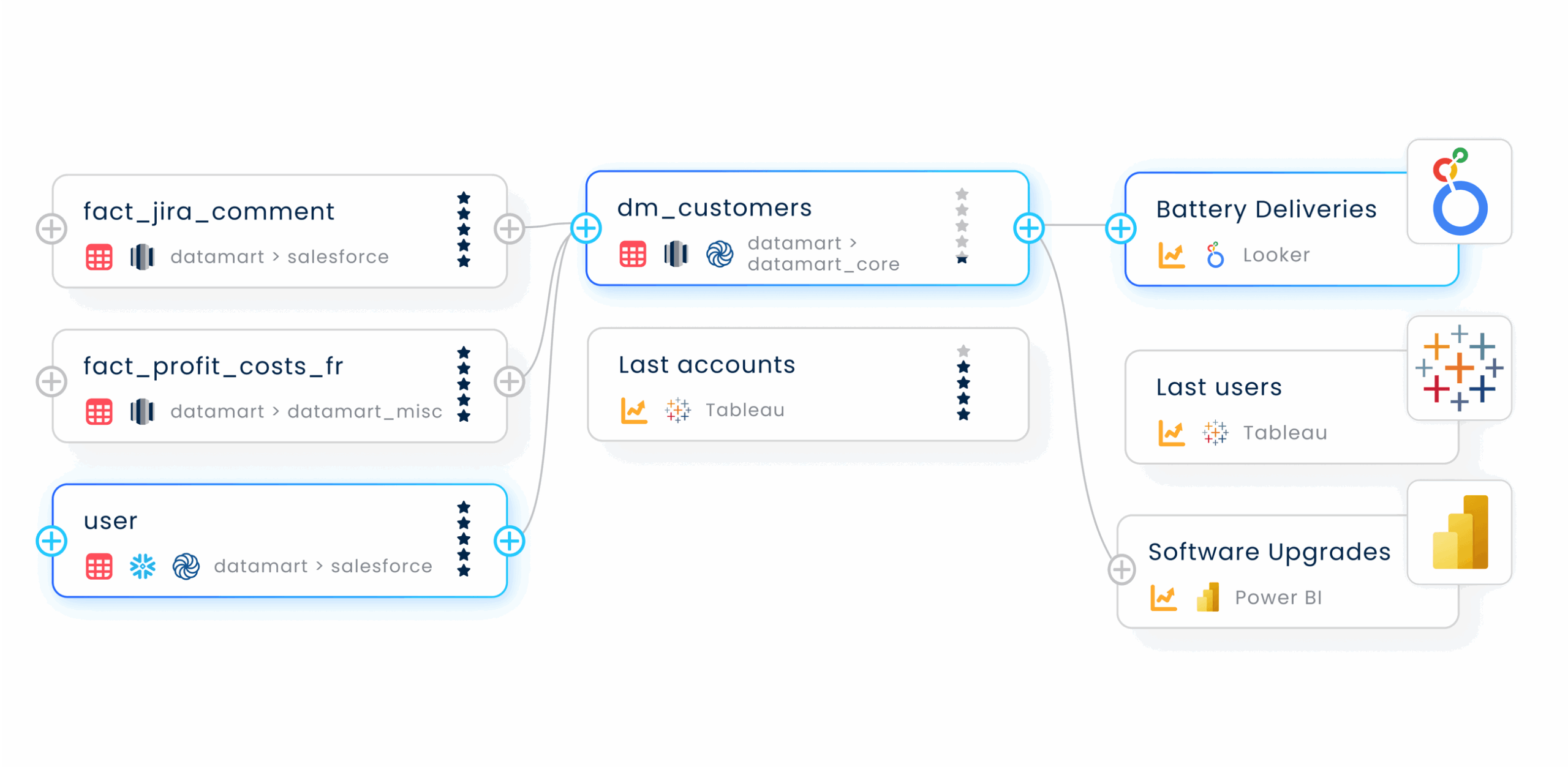
At Coalesce, we’re building tools that let data teams move fast, model safely, and document automatically. Explore how Coalesce helps teams scale transformation and governance without compromise.
Frequently Asked Questions
Lineage platforms use APIs and connectors to pull metadata from your warehouse, BI tools, and transformation logic. In Coalesce, this is part of the Transform and Catalog features, designed to provide full visibility across the stack.
Legacy tools may lack modern APIs or transformation logs, making lineage harder to compute. These environments often require custom solutions or partial lineage, depending on available metadata.
Yes. Real-time lineage is becoming more common as modern platforms enable streaming metadata capture. This allows teams to monitor data flows continuously and respond quickly to changes.
You can simulate a change and see downstream blast radius—affected models, tests, reports, and owners. This de-risks refactors, migrations, and schema updates.
Yes—lineage links columns to terms, owners, classifications, and SLAs. Contracts become enforceable because you can trace who breaks what and where.
It lets you trace a wrong value back through transforms to the exact step/column that changed it. This reduces MTTR (mean time to resolution).
Yes—feature provenance shows how inputs were derived and where they’re used. That transparency supports model trust, audits, and reproducibility.